If you’re an Origin Energy customer, you’ve probably seen the headlines this week. Origin has confirmed it’s investigating a potential security incident that may involve unauthorised access to customer data. The company says it doesn’t believe credit card or bank details were caught up in it, and it’s notified the Australian Cyber Security Centre and the AFP.
Nothing is confirmed yet. Origin hasn’t verified that the sample data circulating in the media is genuine, and it’s worth being patient while the investigation runs. But whether or not this particular incident turns out to be serious, it’s a good moment to run through the playbook — because if you’ve lived in Australia for the last few years, your data has almost certainly been caught up in something.
Optus. Medibank. Qantas. Latitude. And last week, Partnered Health, a network of GP clinics, lost sensitive medical records. More than 500 breaches were reported in Australia in the first half of 2025 alone.
So let’s talk about what to do — not in a panic, but properly.

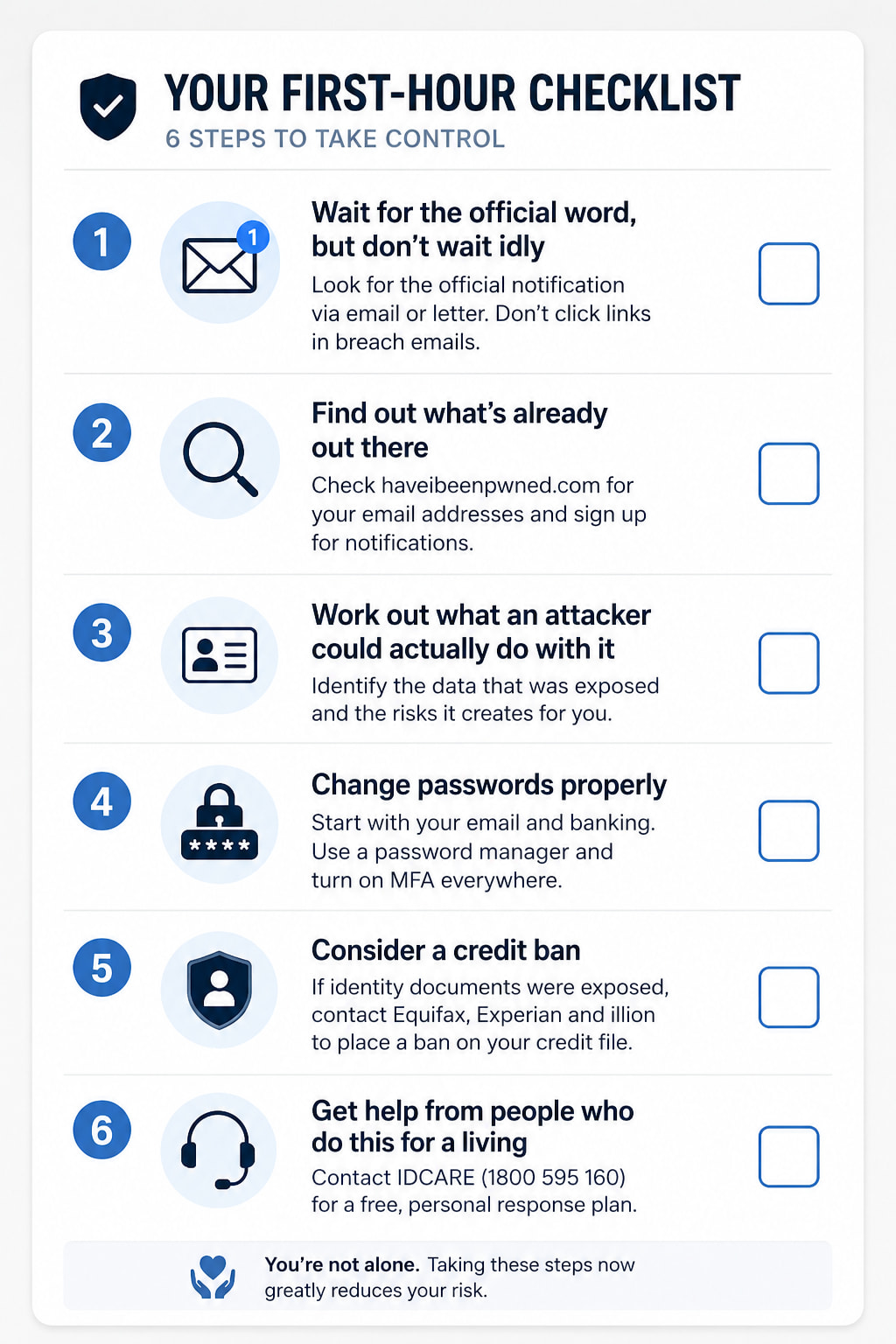
1. What to do when you hear your data may have been accessed
Wait for the official word, but don’t wait idly
The organisation that was breached is legally required to notify you if the incident is likely to cause you serious harm — that’s the Notifiable Data Breaches scheme, run by the Office of the Australian Information Commissioner. You’ll usually hear by email or letter, and you’ll often see it in the media first.
Two cautions here. First, breach notification emails are a phisher’s dream. Scammers know a big breach is in the news, and they’ll send their own “urgent security notice” with a link that harvests your login. Never click a link in a breach email. Go to the company’s website by typing the address yourself, or use the app you already have installed.
Second, don’t assume no news means no impact. Investigations take weeks. Start with the steps below regardless.
Find out what’s already out there
Go to haveibeenpwned.com and enter your email address. It’s a free, well-regarded service run by Australian security researcher Troy Hunt, and it will tell you which known breaches your address has appeared in. Do this for every email address you use, not just your main one.
You can also sign up for notifications, so you’re told automatically next time your address turns up somewhere it shouldn’t.
Work out what an attacker could actually do with it
This is the step most people skip, and it’s the one that matters most. Different data creates different risks:
- Email address and password — the attacker will try that same combination on dozens of other sites. This is called credential stuffing, and it’s why password reuse is so dangerous.
- Name, address, date of birth, phone number — this is identity theft material. Enough of it together lets someone open accounts in your name.
- Driver’s licence, passport or Medicare numbers — serious. These can be used to pass identity checks. They can also be replaced, and you should replace them.
- Bill history, account numbers, customer references — the raw material for a very convincing scam call. “Hi, I’m calling from Origin about your account ending 4471, your last bill was $312.80…”
Write down what was exposed. Your response depends on it.
Change passwords properly
Start with your email account. Your email is the master key — anyone who controls it can reset the password on everything else. Then do your banking, then anything that shared the breached password.
Two rules, and they’re non-negotiable:
-
Never reuse a password. Not a variation, not with a number on the end. A password manager makes this genuinely easy — it generates and remembers unique passwords for every site so you don’t have to. Use password manager apps where possible and create long pass phrases.
-
Turn on multi-factor authentication everywhere it’s offered. An authenticator app is better than SMS, and a passkey or hardware key is better still. If you only do one thing from this entire article, do this one. MFA stops the overwhelming majority of account takeovers dead, even when the attacker has your correct password.
Consider a credit ban
If identity documents were exposed, you can ask the credit reporting bodies to place a ban on your credit file. While it’s in place, no one can open credit in your name — including you, so there’s a small inconvenience if you’re mid-application for something.
You need to contact each of the three bodies separately: Equifax, Experian and illion. The initial ban period is free. Check the current duration and extension process on each of their sites, as this has changed over the years.
Get help from people who do this for a living
IDCARE (idcare.org, 1800 595 160) is Australia and New Zealand’s national identity and cyber support service. It’s free, it’s not-for-profit, and their case managers will build you a personal response plan. If your identity documents were exposed, call them. This is exactly what they exist for, and most people don’t know they’re there.
2. Staying alert in the months that follow
Here’s the uncomfortable part: the risk doesn’t peak in the first week. Stolen data gets traded, combined with other breaches, and worked through methodically. The scam call may come six months from now.
Treat every unexpected MFA prompt as an attack
If your phone buzzes with a verification code or an “approve this login?” prompt that you did not just trigger, someone has your password and is standing at the door.
Never approve it. Deny it, then go and change that password immediately.
Attackers exploit the fact that people tap “approve” reflexively to make the notification go away — sometimes by sending prompts repeatedly at 3am until you cave. That technique has a name, MFA fatigue, and it works. Don’t let it work on you.
Expect the phishing to get better
After a breach, the scams aimed at you stop being generic. When someone knows your name, your address, your account number and what you paid last quarter, “Dear Customer” becomes “Hi Sarah, about your account at 14 Wattle Street.” That’s a different beast entirely.
Signals worth watching for:
- Urgency and consequence. Your account will be suspended, your refund expires today, legal action is pending. Real organisations don’t work this way.
- A push to a different channel. “Call this number”, “message us on WhatsApp”, “download this app to verify.”
- Any request for a code you just received. No legitimate organisation will ever ask you to read out a verification code. Ever. This is the single most reliable tell there is.
- Payment method oddities. Gift cards, crypto, bank transfers to a “new” account.
The rule that covers all of it: hang up and call back on a number you found yourself. Not the number in the message. Not the number the caller gives you. One from the company’s website or the back of your card.
Watch your accounts and your mail
Check bank and card statements more often than usual, and look for small transactions as well as large ones — fraudsters test a card with a $1 charge before doing real damage.
Get a free copy of your credit report from each bureau and look for accounts you don’t recognise. You’re entitled to one free report per bureau per year.
And pay attention to physical mail. A letter welcoming you to a service you never signed up for is a red flag. So is mail that stops arriving — that can mean someone has redirected it.
Tell the people around you
Breach data gets used to target family members too. The “hi mum, this is my new number” scam works because it exploits relationships, not technology. A quick conversation with older relatives about what to expect is worth more than any software.
3. Changing how you think about this
Everything above is damage control. This section is about making the next breach hurt less — and there will be a next breach.
Assume it’s when, not if
No organisation is completely secure. Not banks, not hospitals, not government departments. The Partnered Health incident last week put medical records in the hands of criminals. Origin is one of Australia’s largest energy retailers with more than 4.7 million customers, and it’s now investigating a potential incident of its own.
This isn’t cynicism. It’s just the operating reality, and once you accept it, the question changes in a useful way. It stops being “how do I stop my data being stolen?” — which is largely outside your control — and becomes:
“What did I hand over in the first place, and how do I contain the blast when it leaks?”
That’s a question you can actually do something about.
One detail from the Origin story worth sitting with
The ABC spoke to someone whose phone number appeared in the sample data. They’d already sold their house and left Origin as a customer — and their details were still there.
That’s worth pausing on. Data you handed over years ago, to a company you no longer deal with, is still sitting in a database somewhere with your name on it. You can’t get it back. What you can do is be more deliberate about what you hand over from here.
Give out less
Before you fill in a form, ask whether the field is actually required. Retailers, loyalty programs and apps routinely collect date of birth, full address and phone number because they can, not because they need to.
If a business asks for a copy of your driver’s licence, ask why, ask how long they’ll keep it, and consider whether you want to do business with them at all. Under Australian privacy law, they’re only meant to collect what’s reasonably necessary — and they’re meant to destroy it when it’s no longer needed.
Use email aliases
This is the single most effective habit change in this article, and almost nobody does it.
What an alias is. An alias is a unique, disposable email address that forwards to your real inbox. You give a different one to every company. Mail sent to the alias lands in your normal email, and you can reply from it, so day-to-day nothing changes.
Why it’s powerful. Three things happen at once:
- Containment. When a company gets breached, the attacker gets
origin-x7k2@yourdomain— an address that works nowhere else. Your real address stays out of it. - Attribution. You know exactly who leaked. If an address you only ever gave one company starts receiving spam, you’ve caught them — either they were breached, or they sold your data.
- A kill switch. Delete the alias and the problem is over. No password changes, no migrating accounts, no telling everyone your new address. The spam simply stops arriving.
How it works in practice, using Proton. Proton Mail includes an alias feature built on SimpleLogin, which Proton acquired. When you sign up for something, you generate a fresh address — Proton can create one automatically as you fill in the form via its browser extension, or you can create them manually. Mail forwards to your real Proton inbox, replies go out as the alias, and there’s a switch to disable or delete any alias whenever you like. Free accounts include a small number of aliases; paid plans lift that substantially.
Other providers worth looking at:
- SimpleLogin — the underlying service, still available standalone, and works with any email provider you already use.
- Fastmail — masked email built in, with a well-regarded 1Password integration.
- Apple iCloud+ Hide My Email — included with paid iCloud storage, and integrated into Sign in with Apple. The easiest option if you’re already in Apple’s ecosystem.
- DuckDuckGo Email Protection — free, strips trackers out of forwarded mail.
- Firefox Relay — from Mozilla, free tier plus paid.
- Addy.io — open source, generous free tier, popular with people who want to self-host.
- Your own domain — if you own a domain name, most email hosts let you catch all mail to it, so
[email protected]reaches you. Total control, and you’re not tied to a provider.
Verify before you commit: free-tier alias limits and pricing change regularly. Check the current details on each provider’s site.
A word of caution. Aliases are a containment tool, not a magic shield. Don’t use one for accounts where losing access would be catastrophic — your bank, your government services, your primary recovery email — unless you’re confident you’ll keep that alias provider long-term. If your alias service disappears, so does your access.
The rest of the toolkit
- A password manager. It solves password reuse permanently, and most will now tell you which of your saved passwords have appeared in known breaches.
- Passkeys where offered. They replace passwords with a key stored on your device, and they can’t be phished — there’s nothing to type into a fake site.
- Update your devices. Turn on automatic updates and stop postponing them. A huge share of successful attacks exploit flaws that were patched months earlier.
- Separate your email addresses. At minimum: one for financial and government accounts that you give to almost no one, one for everyday services, one for retail and newsletters.
- Lock down account recovery. Attackers often bypass a strong password by attacking the reset process instead. Check what your recovery options are and make sure they’re as protected as the account itself.
- A phone PIN with your telco. Number porting is how attackers intercept SMS codes. Ring your provider and ask what protections they offer.
Where to get help
 Australia
- IDCARE — idcare.org, 1800 595 160. Free national identity and cyber support. Start here if identity documents were exposed.
- ReportCyber — cyber.gov.au. Report cybercrime and make an official police report online. Also the ACSC’s home for current threat advice.
- Scamwatch — scamwatch.gov.au. Report scams and check what’s currently circulating.
- OAIC — oaic.gov.au. The privacy regulator. Handles the Notifiable Data Breaches scheme and complaints about how organisations handle your data.
- Credit bans — Equifax, Experian and illion. Contact each separately.
- Your bank — the number on your card. All major banks run 24-hour fraud lines.
- Emergency — 000 if you’re in immediate danger.
 United States
- IdentityTheft.gov — the FTC’s step-by-step recovery site. Builds you a personalised plan.
- Credit freeze — Equifax, Experian and TransUnion. Free, and the strongest single protection available.
- annualcreditreport.com — free credit reports.
 United Kingdom
- Action Fraud — actionfraud.police.uk, 0300 123 2040. In Scotland, call Police Scotland on 101.
- ICO — ico.org.uk. The data protection regulator.
- Dial 159 to reach your bank’s fraud team safely.
- Forward scam texts to 7726, scam emails to [email protected].
You’re not the one who got this wrong
One last thing.
When your data leaks, it’s easy to feel exposed and somehow responsible — that you should have been more careful, shared less, chosen better. But you handed that information over because a company asked for it as a condition of getting electricity, or seeing a doctor, or flying home. You did nothing wrong. The organisation that failed to protect it did.
That said, feeling anxious after a breach is completely normal, particularly if you’ve been targeted before. Those feelings are valid and they do pass. If the stress feels like more than you want to carry alone, reach out — Lifeline on 13 11 14 or Beyond Blue on 1300 22 4636 in Australia, 988 in the US, and the Samaritans on 116 123 in the UK.
And come and talk to us in the Online Safety category here on SameBoat. If you’d like a hand setting up aliases, getting a password manager running, or working out what to do about a specific breach, send us a direct message and we’ll walk you through it. We’re all in the same boat.
Note: This article summarises guidance published by official sources including the Australian Cyber Security Centre, the Office of the Australian Information Commissioner, IDCARE and Scamwatch (Australia), the US Federal Trade Commission, and Action Fraud and the ICO (UK). Details of the Origin Energy incident are drawn from ABC News reporting of 22 July 2026; the investigation is ongoing and nothing has been confirmed. This is general information, not financial or legal advice — always check the live guidance on the official sites above, as processes and details change.